
Node类
Node 结点
package javafx.scene;
@IDProperty("id")
public abstract class Node implements EventTarget, Styleable {}场景图节点的基类。场景图是结点的一组树形数据结构,其中分支结点即为 Parent。每个场景图树中只有一个节点没有父节点,这个节点被称为 "根 "节点。
非 Parent 的子类即可称为叶子结点,如:Rectangle, Text, ImageView, MediaView。应用程序不应直接扩展 Node 类。这样做可能会导致抛出 UnsupportedOperationException 异常。
一个节点最多只能在场景图的任何地方出现一次,包括:
- Scene 的根节点
- Parent 的子结点 ObservableList
- 一个 Node 的片段(as the clip of a
Node)
必需确保场景图的结点树不存在循环。
如果程序向父节点(包括Group, Region等)添加子节点,而该节点已经是另一个父节点的子节点或场景的根节点,则该节点会自动(无声地)从其前父节点中移除。如果程序试图以违反上述规则的任何其他方式修改场景图,则会抛出异常,修改尝试将被忽略,场景图将恢复到以前的状态。
可以重新排列场景图的结构,例如将子树从场景图中的一个位置移到另一个位置。为此,通常要先将子树从旧位置移除,然后再将其插入新位置。不过,如果应用程序没有显式地移除子树,它就会如上所述被自动移除。
只要节点对象尚未连接到展示的Window中的场景(a Scene in a Window that is showing),就可以在任何线程上构建和修改。应用程序必须在 JavaFX 应用程序线程上将节点附加到此类场景或对其进行修改。
String id
HTML 标签的 "id "属性,Coordinate Node 都可以设置一个唯一的 id,便于调用 lookup(String id) 进行查找,也便于 CSS 定位以设定 Style。
coordinate 坐标系
The Node class defines a traditional computer graphics "local" coordinate system in which the x axis increases to the right and the y axis increases downwards. The concrete node classes for shapes provide variables for defining the geometry and location of the shape within this local coordinate space.
Node类定义了一个传统的计算机图形 "局部 "坐标系,其中x轴向右转,y轴向下转。Shape 的具体节点子类提供变量,用于定义形状在局部坐标空间中的几何形状和位置。
In practice, most nodes have transformations applied to their coordinate system as mentioned below. As a result, the information above describing the alignment of device coordinates to the pixel grid is relative to the transformed coordinates, not the local coordinates of the nodes.
实际上,大多数节点的坐标系都会发生如下所述的变换。因此,上述描述设备坐标与像素网格对齐的信息是相对于变换后的坐标而言的,而不是节点的本地坐标。
Transformations 变换
平移变换
A translation transformation is one which shifts the origin of the node's coordinate space along either the x or y axis.
平移变换是指沿着 x 轴或 y 轴移动节点坐标空间的原点。
旋转变换
A rotation transformation is one which rotates the coordinate space of the node about a specified "pivot" point, causing the node to appear rotated.
旋转变换是指围绕指定的 "枢轴" 点(锚点)旋转节点的坐标空间,从而使节点呈现旋转状态。
缩放变换
A scaling transformation causes a node to either appear larger or smaller depending on the scaling factor.Scaling alters the coordinate space of the node such that each unit of distance along the axis in local coordinates is multiplied by the scale factor. As with rotation transformations, scaling transformations are applied about a "pivot" point.
缩放变换会根据缩放因子使节点变大或变小。缩放会改变节点的坐标空间,使本地坐标轴上的每个距离单位都乘以缩放因子。与旋转变换一样,缩放变换也是围绕一个 "枢轴" 点(锚点)进行的。
剪切变换
A shearing transformation, sometimes called a skew, effectively rotates one axis so that the x and y axes are no longer perpendicular.
剪切变换(有时也称为倾斜)实际上是旋转一个轴,使 x 轴和 y 轴不再垂直。
自定义变换
自定义变换可通过 transforms list 应用。预定义变换使用下面指定的属性应用,表示变换的矩阵按此顺序相乘:
- Layout (
layoutX,layoutY) and translate (translateX,translateY,translateZ) - Rotate (
rotate) - Scale (
scaleX,scaleY,scaleZ) - Transforms list (
transforms) starting from element 0
变换的应用
一个节点可应用多种变换。
变换的应用顺序与上述矩阵乘法相反:transforms list 的最后一个元素到第 0 个元素 scale、rotate、layout and translate。按此顺序应用变换后,节点本地坐标中的边界将转换为节点父坐标中的边界(请参阅 "边界矩形 "部分)。
Bounding Rectangles 边界矩形
由于每个 Node 都有变换,因此每个节点的几何边界矩形可以根据是否考虑变换而有不同的描述:
未经变换的结点的边界矩形 (the bounding rectangle of the
Nodein untransformed local coordinates)每个
Node都有一个只读的boundsInParent变量,用于指定Node的边界矩形,该矩形的本地坐标未经变换。boundsInLocal包含节点的形状几何,包括可能位于本地位置/大小变量之外的非零描边所需的任何空间,以及节点的clip和effect变量。所有变换应用后的结点的边界矩形 (the bounding rectangle of the
Nodeafter all transformations have been applied)每个
Node都有一个只读的boundsInParent变量,用于指定 "变换 "部分中指定的所有变换应用后Node的边界矩形。该矩形将相对于父节点的坐标系。这是节点的 "可视 "边界。故称
boundsInParent(父节点边界)。
结点的 layoutBounds 变量定义了Node的矩形边界,该边界应作为布局计算的基础,可能与节点的视觉边界不同。
对于 shapes, Text 和 ImageView,默认情况下布局边界只包含几何形状,包括非零 strokeWidth(描边) 所需的空间,但不包括effect、clip、transforms.。但不包括效果、剪辑或任何变换。
对于可调整大小的类(Region 和 Control),layoutBounds 将始终映射到 0,0 width x height 。
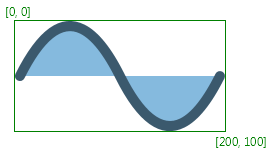
未进行任何变换
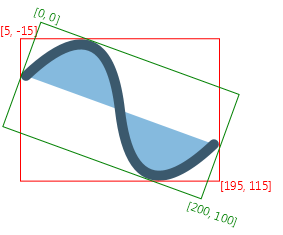
应用旋转20度后
红:父结点的 boundsInParent 边界 (
boundsInParentin the coordinate space of the Node's parent)绿:此结点的 boundsInLocal 边界
CSS
The Node class contains id, styleClass, and style variables that are used in styling this node from CSS. The id and styleClass variables are used in CSS style sheets to identify nodes to which styles should be applied. The style variable contains style properties and values that are applied directly to this node.
For further information about CSS and how to apply CSS styles to nodes, see the CSS Reference Guide.
Node 常用 API
关键字:
- bounds,layout,parent,local
- cursor,hover,focus
- id,style,blendMode
- drag,mouse,key,rotate,scroll,swipe,touch,zoom,press,scale,translate,resize
- help,role,text,baseline,width,heigh,screen
// 实例方法
void applyCss();
void autoResize();