
VertexAI使用指南
2024/7/1大约 4 分钟
获取 access_token
使用 refresh_token
Google cloud shell执行
gcloud auth application-default login查看 application_default_credentials.json
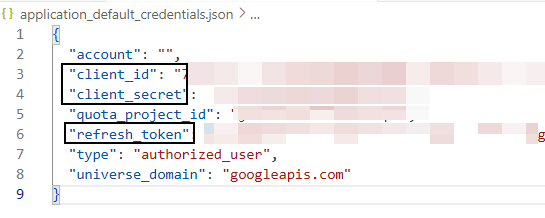
获取 access_token
const TOKEN_URL = 'https://www.googleapis.com/oauth2/v4/token';

let tokenCache = {
    accessToken: '',
    expiry: 0,
    refreshPromise: null
};
/**
 * 允许高并发
 */
async function getAccessToken() {
    const now = Date.now() / 1000;

    // 如果 token 仍然有效,直接返回
    if (tokenCache.accessToken && now < tokenCache.expiry) {
        return tokenCache.accessToken;
    }

    // 如果已经有一个刷新操作在进行中,等待它完成
    if (tokenCache.refreshPromise) {
        await tokenCache.refreshPromise;
        return tokenCache.accessToken;
    }

    // 开始新的刷新操作
    tokenCache.refreshPromise = (async () => {
        try {
            const response = await fetch(TOKEN_URL, {
                method: 'POST',
                headers: {
                    'Content-Type': 'application/json'
                },
                body: JSON.stringify({
                    client_id: CLIENT_ID,
                    client_secret: CLIENT_SECRET,
                    refresh_token: REFRESH_TOKEN,
                    grant_type: 'refresh_token'
                })
            });

            const data = await response.json();

            tokenCache.accessToken = data.access_token;
            tokenCache.expiry = now + data.expires_in;
        } finally {
            tokenCache.refreshPromise = null;
        }
    })();

    await tokenCache.refreshPromise;
    return tokenCache.accessToken;
}
使用 google-auth-library
创建服务账号 https://console.cloud.google.com/iam-admin/serviceaccounts
创建服务账号的密钥
{
  "type": "service_account",
  "project_id": "***",
  "private_key_id": "***",
  "private_key": "-----BEGIN PRIVATE KEY-----\n-----END PRIVATE KEY-----\n",
  "client_email": "***",
  "client_id": "***",
  "auth_uri": "https://accounts.google.com/o/oauth2/auth",
  "token_uri": "https://oauth2.googleapis.com/token",
  "auth_provider_x509_cert_url": "https://www.googleapis.com/oauth2/v1/certs",
  "client_x509_cert_url": "***",
  "universe_domain": "googleapis.com"
}
获取 access_token
npm install google-auth-libraryimport { JWT } from "google-auth-library";
const client = new JWT(
client_email,
null,
private_key,
['https://www.googleapis.com/auth/cloud-platform']
)
return client.authorize().then(()=>{
client.credentials.date_str = getDateStr(client.credentials.expiry_date)
TOKEN[o.client_email] = client.credentials
return client.credentials
})vertex to Claude API
开启 Claude 系列模型
构建 to API
- 从
x-api-key请求头中解析需要的数据:如project_id、鉴权值、获取 access_token 所需的参数 - api 端点对齐
/v1/messages
async (request) => {
    const [projectId, client_email, private_key] = request.headers.get("x-api-key").split(".").map(v => atob(v))
    // get access_token service, you can replace it to yours
    const accessToken = await getVertexAccessToken(client_email, private_key);

    const bodyData = await request.json()
    bodyData.anthropic_version = "vertex-2023-10-16"

    const location = MODELS[bodyData.model].region
    const vertexName = MODELS[bodyData.model].vertexName

    bodyData.model = undefined

    const response = await fetch(`https://${location}-aiplatform.googleapis.com/v1/projects/${projectId}/locations/${location}/publishers/anthropic/models/${vertexName}:streamRawPredict`, {
        method: 'POST',
        headers: { 'Authorization': `Bearer ${accessToken}`, 'Content-Type': 'application/json; charset=utf-8' },
        body: JSON.stringify(bodyData)
    });

    return response
}
const MODELS = {
    "claude-3-opus-20240229": {
        vertexName: "claude-3-opus@20240229",
        region: "us-east5",
    },
    "claude-3-sonnet-20240229": {
        vertexName: "claude-3-sonnet@20240229",
        region: "us-central1",
    },
    "claude-3-haiku-20240307": {
        vertexName: "claude-3-haiku@20240307",
        region: "us-central1",
    },
    "claude-3-5-sonnet-20240620": {
        vertexName: "claude-3-5-sonnet@20240620",
        region: "us-east5",
    }
};
imagen to OpenAI API
申请开通文生图
https://docs.google.com/forms/d/1cqt9padvfMgqn23W5FMPTqh7bW1KLkEOsC5G6uC-uuM/viewform?hl=zh-cn
构建 to API
// 鉴权:Bearer THIS_API_KEY
async (request) => {
const [projectId, client_email, private_key] = "..."
const accessToken = await getVertexAccessToken(client_email, private_key);
// body 是符合 OpenAI API 的请求对象
const body = await request.json();
const { model, messages, stream } = body;
if (!model || !messages || messages.length === 0) {
return error(400)
}
// 不支持历史聊天,取最后一个消息内容
const prompt = messages[messages.length - 1].content;
const apiUrl = `https://us-central1-aiplatform.googleapis.com/v1/projects/${projectId}/locations/us-central1/publishers/google/models/${model}:predict`;
const data = await fetch(apiUrl, {
method: 'POST',
headers: {
'Authorization': `Bearer ${accessToken}`,
'Content-Type': 'application/json'
},
body: JSON.stringify({
"instances": [
{
"prompt": prompt
}
],
"parameters": {
"sampleCount": 1
}
})
}).then(r => r.json());
/**
* @type {string[]}
*/
const imagesBase64 = data.predictions.map(prediction => prediction.bytesBase64Encoded);
const uploadResponses = await Promise.all(imagesBase64.map(base64 => {
const uint8Array = Uint8Array.from(atob(base64), c => c.charCodeAt(0));
const uploadFormData = new FormData();
uploadFormData.append('file', new Blob([uint8Array], { type: 'image/png' }), 'image.png');
return fetch('https://telegra.ph/upload', {
method: 'POST',
body: uploadFormData
});
}));
// 代理图片 url,从而避免因为网络封锁而造成图片访问不了
// 不使用代理:fileProxyPrefix = "https://telegra.ph"
const fileProxyPrefix = "https://api.274452.xyz/tools/proxy.forward/https://telegra.ph";
// 最终响应给用户的图片url地址 string[]
const imagesURLs = await Promise.all(uploadResponses.map(async (response, index) => {
if (!response.ok) {
throw new Error('Failed to upload image');
}
const result = await response.json();
// console.log(result); // [ { src: '/file/8f125f0f4e357d0ec2aaa.png' } ]
return fileProxyPrefix + result[0].src;
}));
// 转 OpenAI API 响应格式
const id = `imggen-${Math.floor(Date.now())}`
if (stream) {
return new Response(ReadableStream.from(imagesURLs).pipeThrough(new TransformStream({
transform(chunk, controller) {
const comp = getCompTemplate(true, id, model, `\n`)
controller.enqueue(`data: ${JSON.stringify(comp)}\n\n`);
}
})).pipeThrough(new TextEncoderStream()),{
status: 200,
headers: getResponseHeader(true)
})
} else {
// 非流式返回
const comp = getCompTemplate(false, id, model)
comp.choices[0].message.content = imagesURLs.map(url => `\n`).join('')
return new Response(JSON.stringify(comp), {
status: 200,
headers: getResponseHeader(false)
})
}
}
// ======== 公共函数 ========
/**
* 获取 Vertex 的 access_token,使用 google-auth-library
* @param {string} client_email
* @param {string} private_key
* @returns
*/
async function getVertexAccessToken(client_email, private_key) {
const r = await fetch("https://itty.274452.xyz/vertex/access_token", {
method: "POST",
body: JSON.stringify({ "client_email": client_email, "private_key": private_key }),
headers: {
"Content-Type": "application/json"
}
});
const o = await r.json();
return o.access_token;
}
/**
* 获得响应对象模板
* @param {object} stream
* @returns
*/
function getCompTemplate(stream, id, model, content) {
if (stream) {
return {
"id": id || "",
"object": "chat.completion.chunk",
"created": Math.round(Date.now() / 1000),
"model": model || "",
"choices": [
{
"index": 0,
"delta": {
"role": "assistant",
"content": content || ""
},
"logprobs": null,
"finish_reason": null
}
]
}
}
return {
"id": id || "",
"object": "chat.completion",
"created": Math.round(Date.now() / 1000),
"model": model || "",
"usage": {
"prompt_tokens": 0,
"completion_tokens": 0,
"total_tokens": 0
},
"choices": [
{
"message": {
"role": "assistant",
"content": content || ""
},
"finish_reason": "stop",
"index": 0
}
]
}
}
/**
* 获取响应对象的响应头
* @param {boolean} steam
* @returns
*/
function getResponseHeader(steam) {
return steam ? {
'Access-Control-Allow-Origin': '*',
'Access-Control-Allow-Headers': '*',
'Content-Type': 'text/event-stream',
'Cache-Control': 'no-cache',
'Connection': 'keep-alive',
} : {
'Access-Control-Allow-Origin': '*',
'Access-Control-Allow-Headers': '*',
'Content-Type': 'application/json',
'Cache-Control': 'no-cache',
'Connection': 'keep-alive',
}
}模型:
imagegeneration@002imagegeneration@005imagegeneration@006